
Download Buscador Educativo – educational search, homework help, student research, online learning, academic tools
Overview
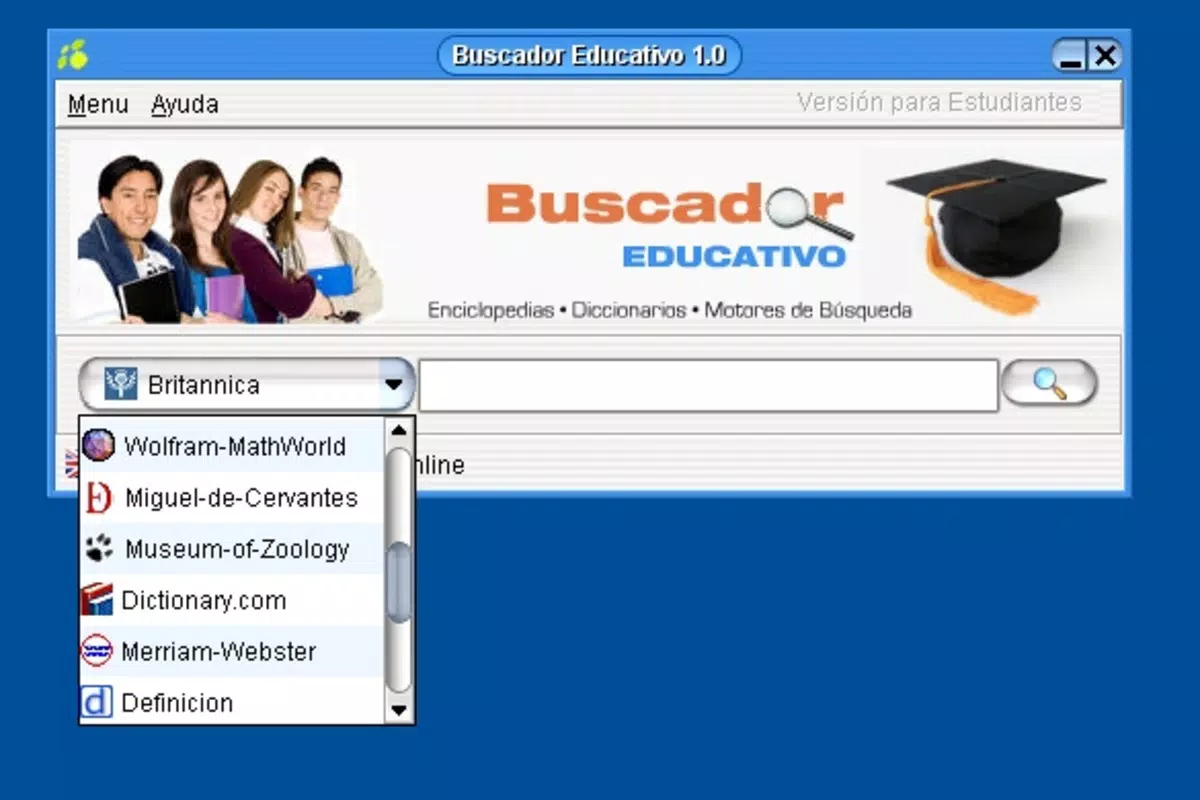
Buscador Educativo is a specialized mobile application designed to support students in their academic research and homework completion. The app serves as a centralized hub that streamlines the process of finding reliable information by integrating access to multiple search engines and trusted educational resources. Its primary purpose is to reduce the time and effort required to locate accurate data, making it particularly valuable for learners engaged in school or university-level assignments. By consolidating tools like Britannica, Wikipedia, Wolfram MathWorld, and Dictionary.com into a single interface, the app enhances the efficiency of research tasks and promotes independent learning.
Target users include middle school, high school, and early college students who rely on the internet for academic work. The app is especially beneficial for those who frequently switch between browsers and search platforms, seeking a more organized and focused approach. While the developer did not provide additional background information, the app’s long-standing presence since its release in December 2008 suggests a consistent utility for its user base. Real-world use cases involve quick fact-checking, topic exploration, and accessing authoritative sources during study sessions or while writing reports.
Within the broader mobile app ecosystem, Buscador Educativo fills a niche by offering a focused, no-frills tool tailored specifically for educational research. It stands out as a lightweight, free utility that prioritizes functionality over flashy design, appealing to users who value practicality and speed in their learning workflow.
Key Features & Functionality
- Multiple Search Engines Integration: Users can perform searches across several leading search engines directly within the app, eliminating the need to open a separate browser tab. This feature allows for rapid comparison of results and faster access to relevant content.
- Independent Operation Mode: The app runs independently of the default web browser, enabling users to keep it open while navigating other websites or completing assignments. This seamless workflow minimizes context switching and supports sustained focus.
- Direct Access to Reputable Encyclopedias: Built-in links to Britannica and Wikipedia provide instant access to well-vetted, comprehensive articles. This integration ensures students can verify facts and deepen their understanding of complex topics.
- Specialized Academic Resources: The app includes curated links to advanced tools such as Wolfram MathWorld for mathematics and Dictionary.com for vocabulary clarification. These resources expand the scope of research beyond basic web searches.
- User-Friendly Interface: Designed with simplicity in mind, the interface features clear navigation and minimal clutter. Even users with limited technical experience can quickly learn how to use the app effectively for academic purposes.
For example, a high school student working on a science project can use Buscador Educativo to simultaneously search for general information, consult Wikipedia for background context, and access Wolfram MathWorld for equations related to their topic—all without leaving the app. This integrated approach enhances comprehension and reduces the cognitive load associated with managing multiple tabs and platforms.
Interface, UX & Performance
The app presents a clean, straightforward interface optimized for quick access to its core functions. Navigation is linear and intuitive, with clearly labeled sections for different types of resources. The visual style prioritizes readability and functionality over decorative elements, which aligns with its educational purpose. Users can expect a consistent layout that supports efficient information retrieval.
Although the developer did not list formal performance metrics, the app’s small file size of 2.3 MB suggests it is lightweight and optimized for older or low-spec Android devices. This makes it accessible to a broad range of users, including those with budget smartphones. The app is designed to launch quickly and respond promptly to user input, contributing to a smooth experience during time-sensitive academic tasks.
Responsiveness appears to be stable, as the app operates independently of the browser and maintains its state while users switch between tasks. Stability is further supported by its long-standing presence on the platform since 2008, indicating consistent performance over time. However, specific requirements for device compatibility were not disclosed, so users should ensure their system meets general Android standards for app installation.
Platform Compatibility & Technical Requirements
Buscador Educativo is available exclusively on the Android platform. The app’s current version is 1.1, with a file size of 2.3 MB, making it a compact download suitable for devices with limited storage. It is offered at no cost, reinforcing its accessibility for students across different economic backgrounds.
The developer did not specify minimum OS requirements or compatibility details for specific Android versions. As such, users should verify whether the app runs on their device’s operating system. While the app has been available since 2008, it may not support the latest Android releases without updates. The absence of updated technical specifications suggests that the app may be maintained in a basic functional state, focusing on core features rather than modern enhancements.
Pros and Cons
Pros
- Free to download and use, reducing financial barriers for students.
- Compact file size of 2.3 MB, ideal for devices with limited storage.
- Integrates multiple search engines and authoritative educational resources in one place.
- Operates independently of the default web browser, enabling uninterrupted workflow.
- Simple, intuitive interface designed for ease of use by students of all levels.
Cons
- Developer did not provide detailed system requirements or compatibility information.
- Version 1.1 has not been updated since 2008, raising concerns about long-term support.
- Limited visual design and modern interface features.
- No mention of offline functionality or data privacy policies.
- May not be compatible with newer Android versions without updates.
FAQ
Is Buscador Educativo safe to download and use?
The app is available for free on Android and has been in use since 2008. While the developer did not publish a privacy policy, the app does not require excessive permissions, suggesting a low-risk profile for standard academic use.
Can I use Buscador Educativo offline?
Specific information about offline functionality was not provided. The app relies on internet access to retrieve data from external sources such as Wikipedia and Wolfram MathWorld.
Does Buscador Educativo support iOS devices?
The app is currently available only on the Android platform. There is no official version for iOS devices.
How often is Buscador Educativo updated?
The current version is 1.1, released in 2008. No recent updates have been reported, indicating that the app may be maintained in a static state with minimal changes.
Is Buscador Educativo secure for student research?
The app provides access to reputable sources like Britannica and Wikipedia, which are generally considered reliable for academic work. However, users should always verify information from multiple sources and exercise critical thinking when conducting research.
Final Thoughts
Buscador Educativo remains a uniquely focused tool for students seeking efficient, reliable access to academic resources. Despite its outdated version and lack of modern features, its core functionality continues to serve a clear purpose: simplifying the research process. The app’s lightweight design, free availability, and integration of trusted educational platforms make it a valuable asset for learners who prioritize practicality over aesthetics.
While newer alternatives may offer more advanced capabilities, Buscador Educativo stands out for its simplicity and long-standing utility. It is particularly suited for students using older devices or those who prefer a no-nonsense approach to online learning. For anyone in need of a straightforward, secure, and effective academic search tool, this app delivers consistent value.
Download Buscador Educativo now


